
Product
One workspace for the whole study.
Set up the study, run it across clinics and owners, review every record, and close it with exports a monitor can verify. Every screen on this page is the current product, shown in an example study.
Product walkthrough
Coordinate, collect, supply, review.
Four views from the example study: the coordinator’s day, the owner’s check-in, the supply chain and the monitor’s review.
Coordinate
Start the day with your site’s list.
Today puts a coordinator’s work in order: overdue clinic visits first, then the visits open now, owners to contact and queries to answer. A visit starts from the list, or is recorded as missed.
- Overdue visits, with the window each one had
- Owner notes waiting for a decision
- The week ahead, day by day

Collect
Owner reports that arrive complete.
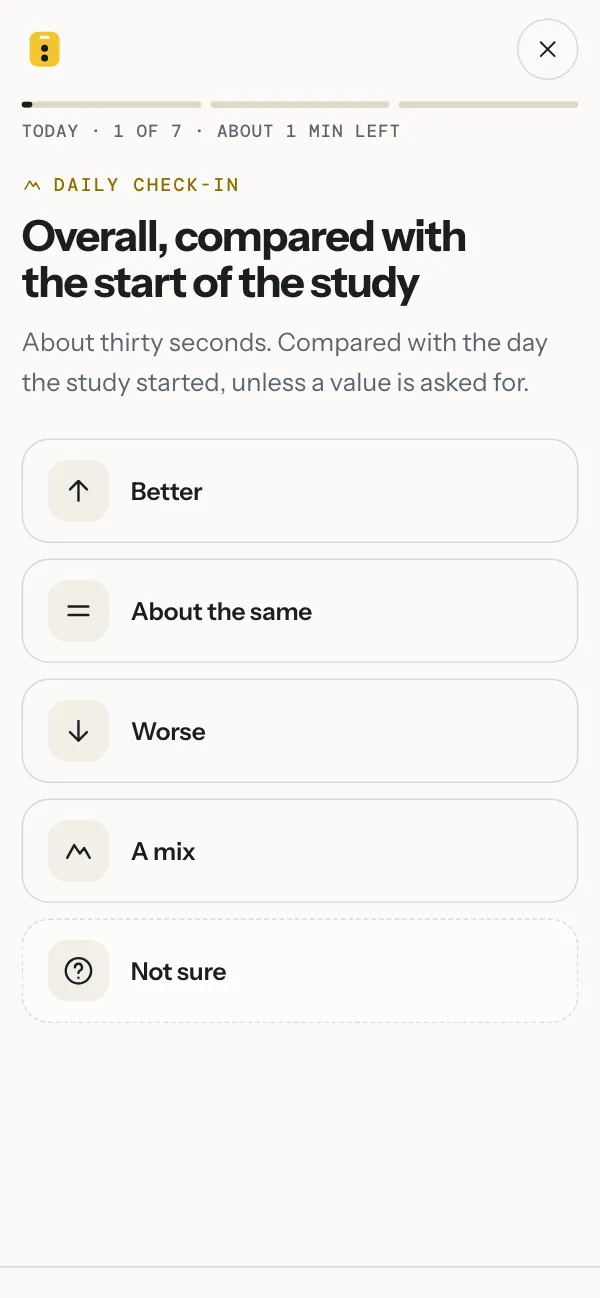
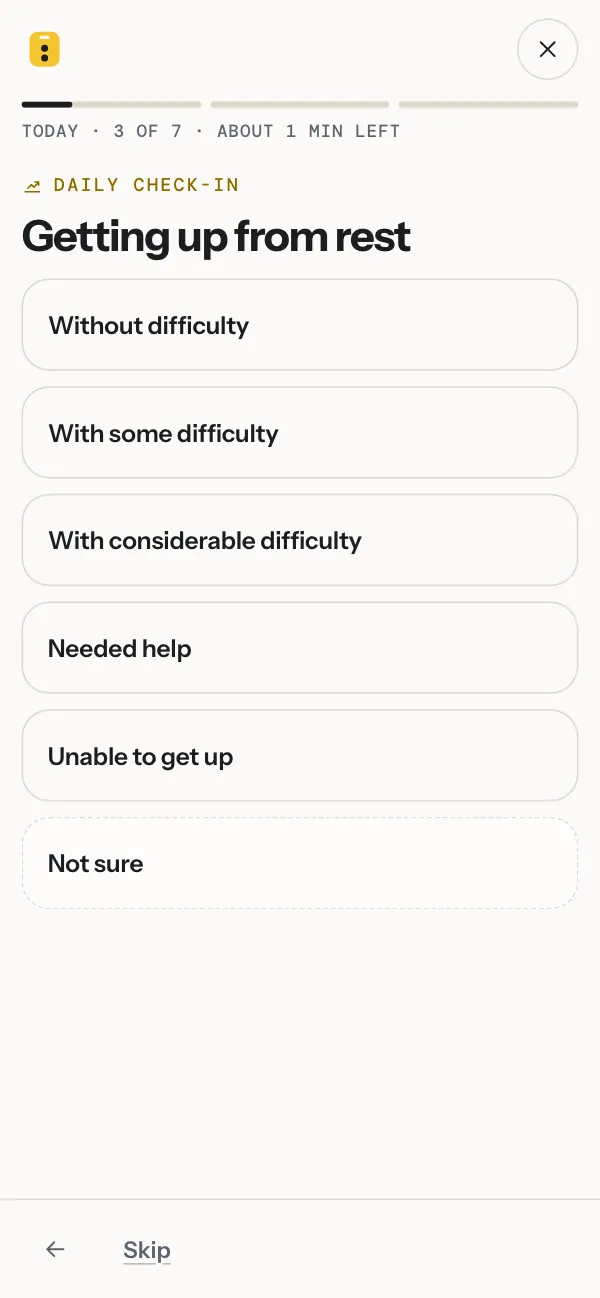
Owners answer one question per screen from a link in an email, in about a minute. Reminders follow the study’s schedule. Each entry carries the time it was made, and a missed day stays a gap.
- eConsent signed on the owner’s phone
- Daily or weekly check-ins, photos and questionnaires
- Each note sorted as a possible adverse event, a question or routine
Supply
Every site stocked before it runs out.
The supply chain reads the ledger and the dose table: what each clinic holds, how many days that lasts at its pace, and what every dog has at home until its next visit. A shipment is built in four steps from what a place needs, with the carrier’s label and a packing slip.
- Stock by place, with the day each site runs out
- Needs per dog, from the dose table and what was handed over
- Coded kits, lots and devices tracked to the owner and back

Review
Queries, checks and sign-off in one place.
Data checks raise a query the moment a value is saved. The monitor reads the record beside the question, the site answers where it was asked, and the investigator signs off by visit.
- Checks written before the first animal is enrolled
- Source verification and sign-off by the study’s own plan
- Signatures that ask for the password again

Example study CMF-2026: a two-arm, double-blind study across four clinics. The organizations, people and dogs are fictional; every screen is the current product.
Signalment Assistant
Hand it the protocol. Check what it drafts.
Signalment Assistant does the reading and drafting that slows a study down: the set-up from the protocol, a reviewer’s pass over it, data checks, clinic records and adverse-event coding. Your team decides what stays.
Set up
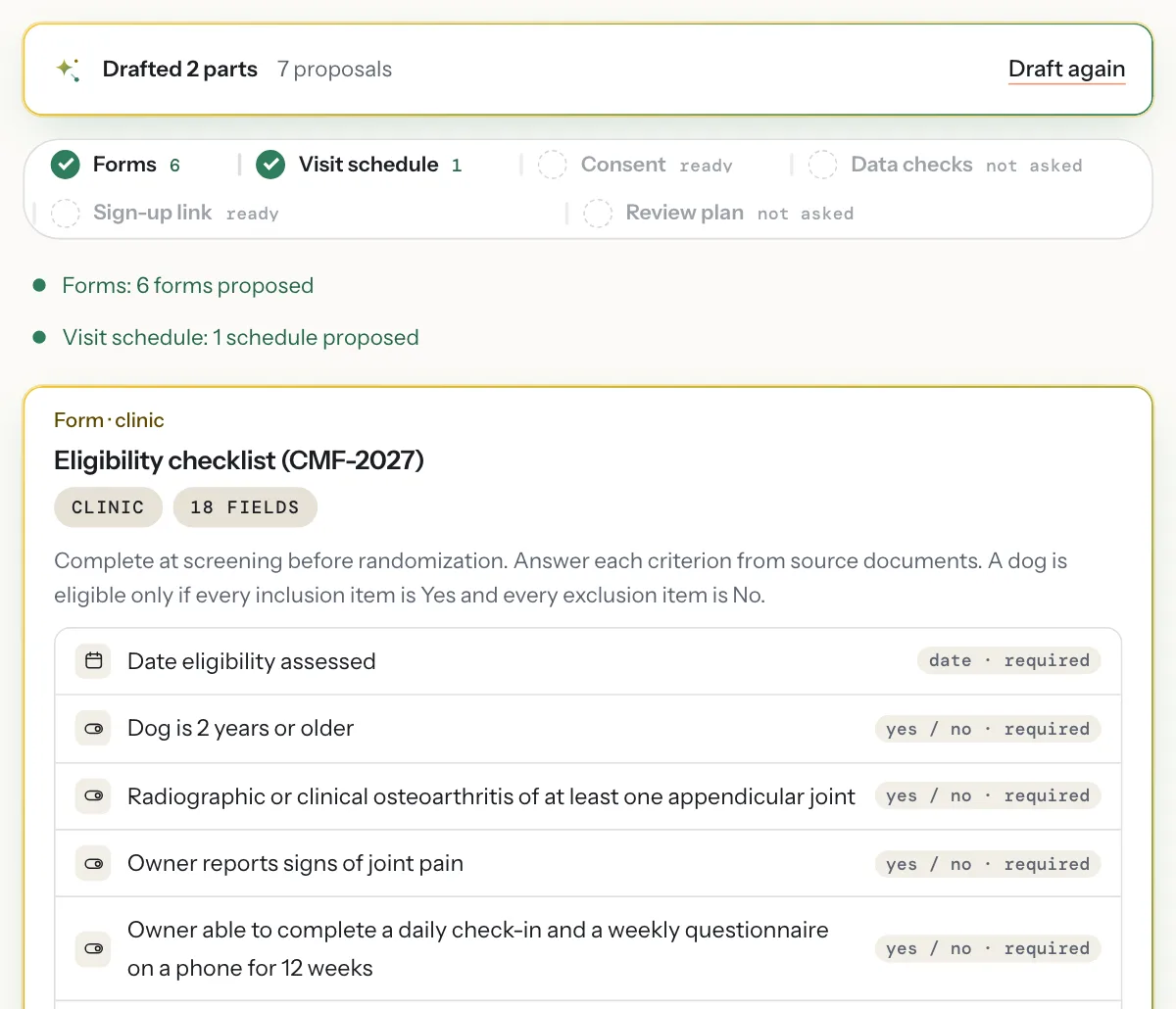
Forms and a visit schedule, drafted from the protocol.
Upload the protocol, or describe the study in a few lines. The assistant proposes the forms, the visit schedule, the consent text, the sign-up questions, the data checks, the review plan and, for a study that dispenses product, the components, dose table and devices of its supply chain. Each proposal meets the same rules as a form your team builds by hand, and you accept them one at a time.
- Reads a PDF, a photo of a page or the protocol text
- Says why each form and visit is there
- Nothing is added until someone accepts it
Protocol
A reviewer’s reading of the protocol.
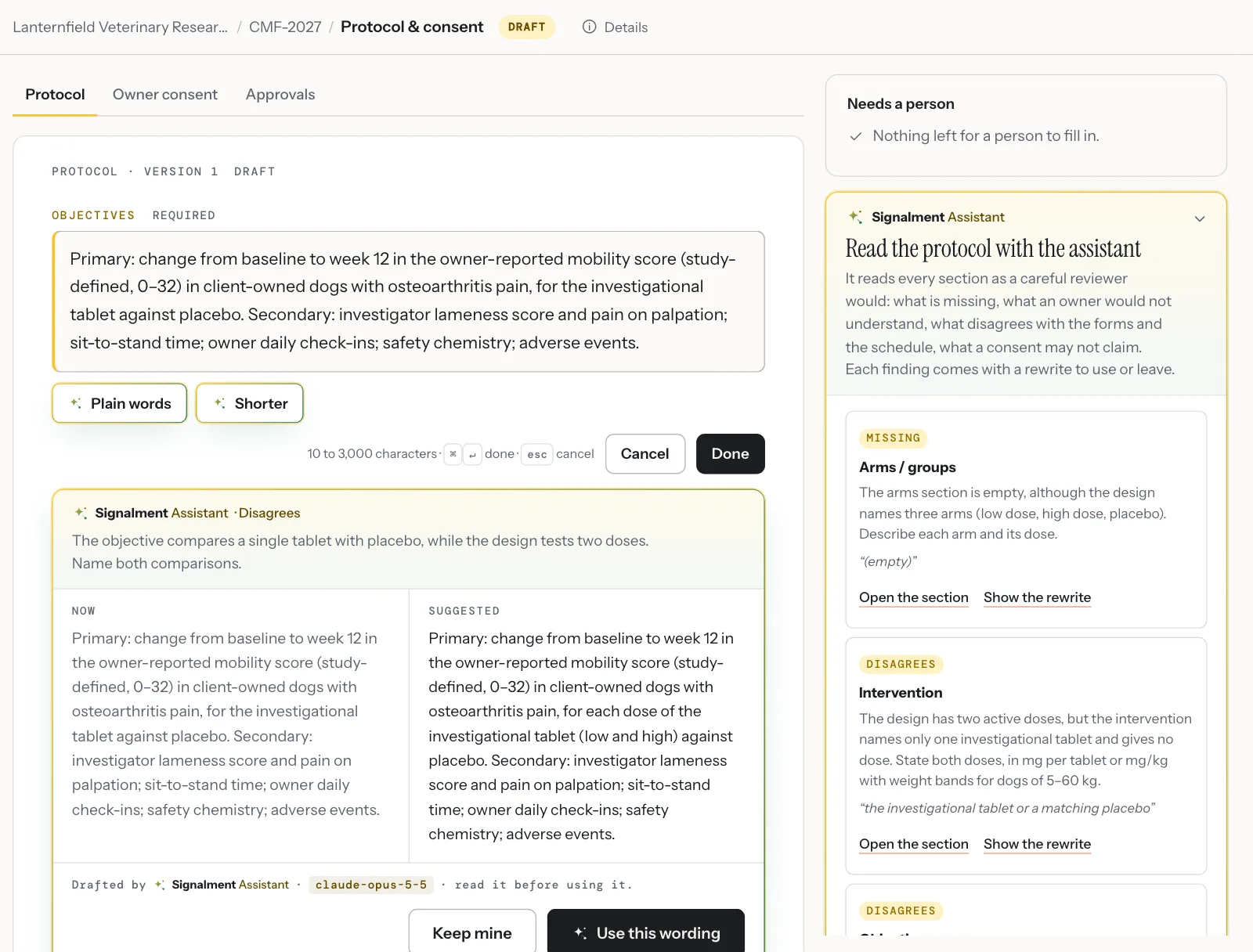
It reads every section for what is missing, what an owner would not understand and what disagrees with the forms and the schedule. Each finding quotes the words it is about and comes with a rewrite to use or leave. The consent gets the same reading.
- Findings beside the sections they concern
- A rewrite shown next to the wording it replaces
- Nothing changes until you use it and save
Data checks
The checks a data manager would set.
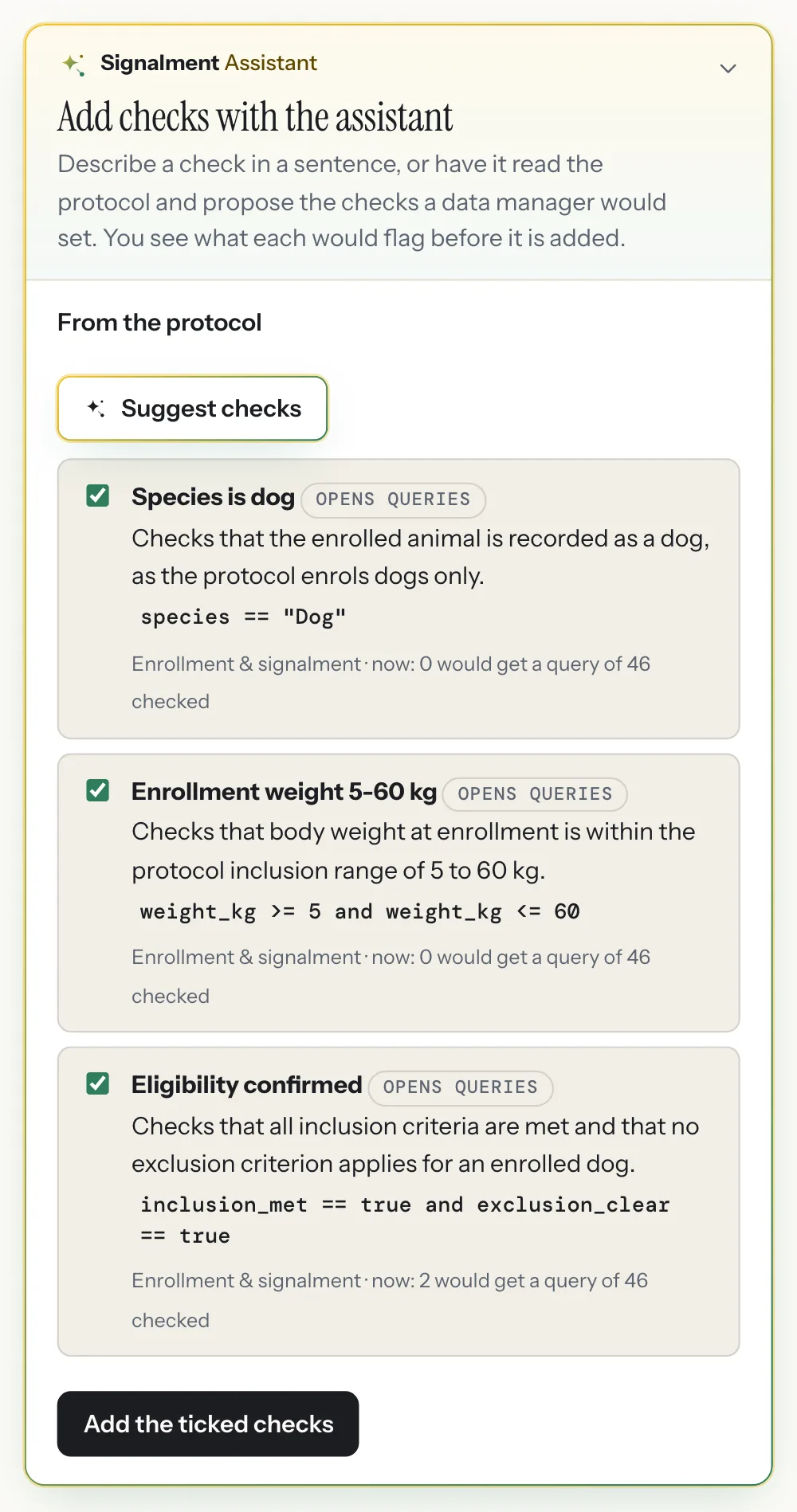
From the protocol and the forms it proposes data checks before the first animal is enrolled: inclusion criteria, ranges, dates in order. Each one shows how many records it would query in the data already entered, so the useful ones go in and the noisy ones do not. A check can also start as a sentence.
- Each rule compiled against the study’s own forms
- What it would flag now, before it is added
- Queries open by themselves once it is on
Clinic records
A lab report, read into the record.
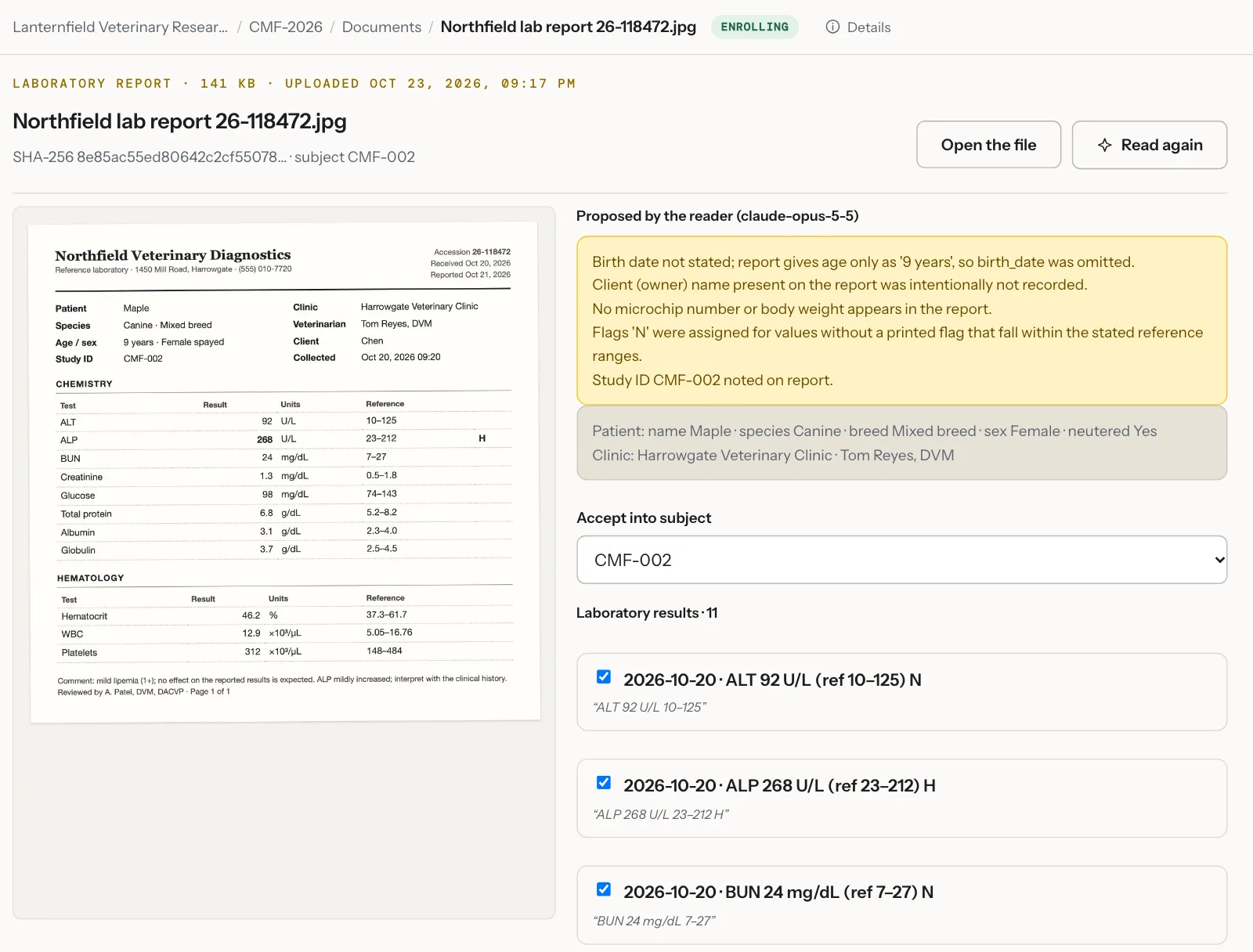
Upload a scan or a PDF from the clinic. The reader proposes each result and history line with the words it came from, and notes what it left out and why. Owner details are never proposed. The lines you tick become records linked to the document.
- Every line carries its source quote
- Results with units, reference range and flag
- Accepted lines keep a link to the file
Adverse events
Adverse events coded to VeDDRA.
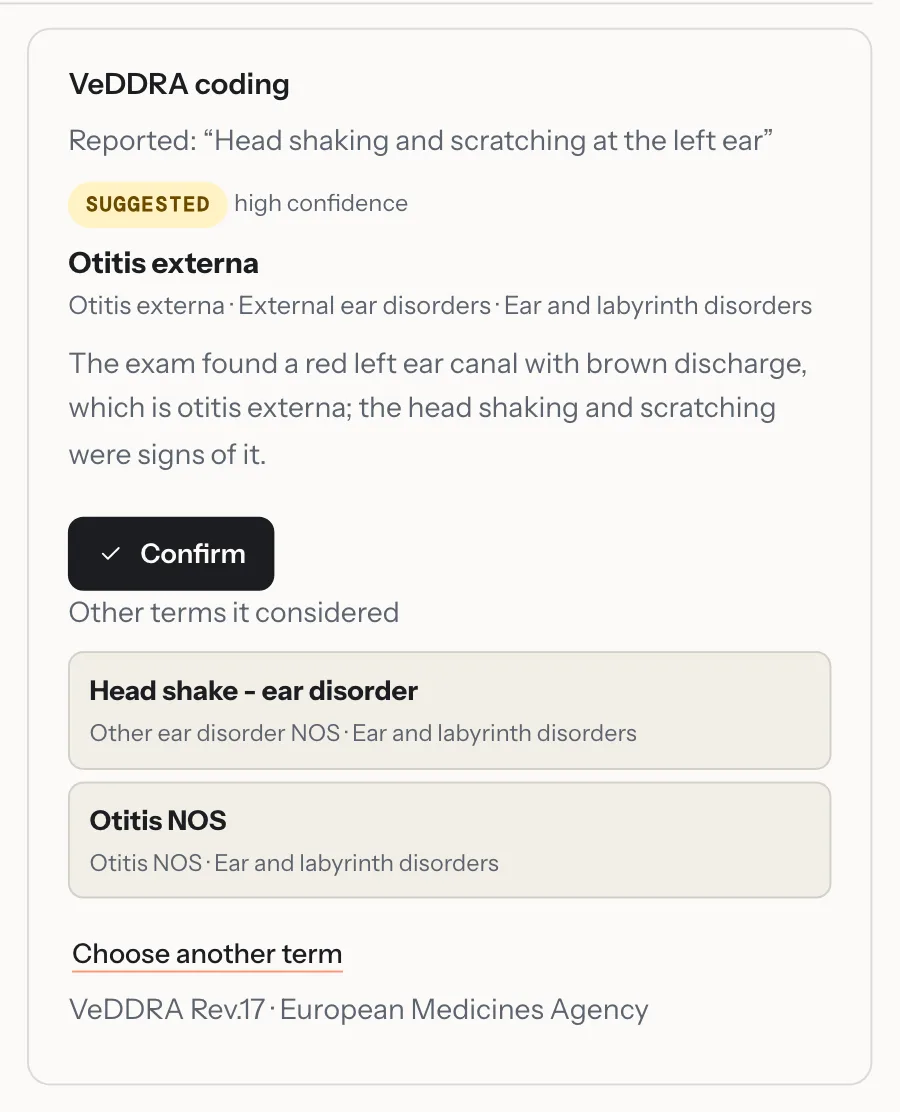
The words the site recorded go to the assistant, which suggests a VeDDRA term with its confidence, its reasoning and the other terms it considered. The investigator confirms it or chooses another from the dictionary, and the export carries the coding.
- VeDDRA, the European Medicines Agency’s dictionary
- Confirmed by a person before it counts
- Marked for coding again if the event’s words change
- Off until you turn it onA workspace owner turns it on, and can turn each task on or off.
- A proposal, never an entryNothing reaches a study record until a person accepts it.
- On the audit trailWhat was proposed, what was accepted and which model proposed it.
- Not used for trainingWhat it reads is sent to Anthropic under terms that do not permit training on it.
The answers on these screens are the assistant’s own, on the example study. Ask how to do anything with ⌘/: the answer links to the page, and it never sees a record or a name.
Supply chain
Product, kits and devices, from the depot to the dog and back.
A module a study turns on when it dispenses something: an investigational product, a supplement, a coded kit, an activity collar.
Know what every site and every dog has.
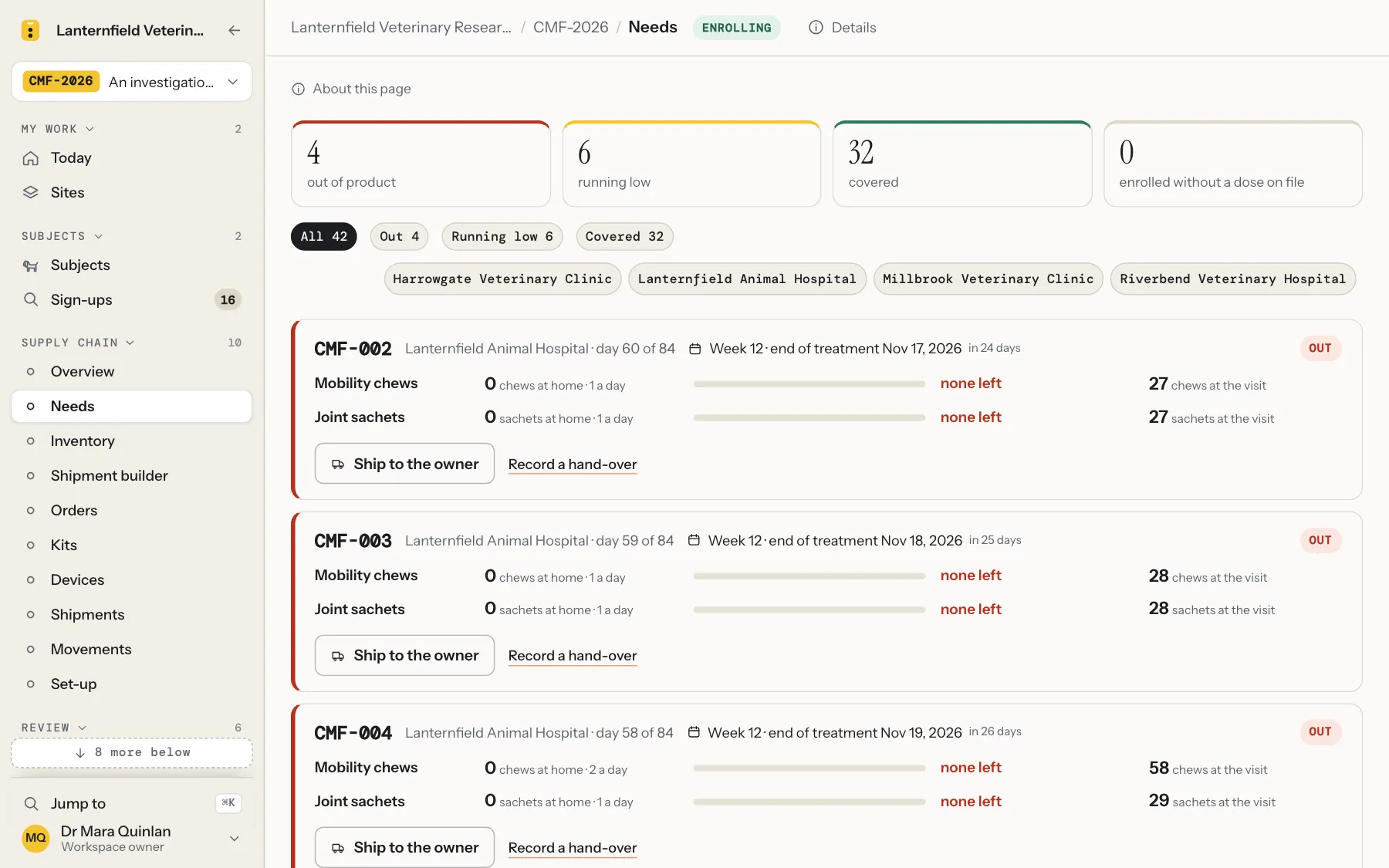
The ledger and the dose table together say what each clinic holds, how many days that lasts at its own pace, and what each dog has at home until its next visit. The Overview opens with what needs attention; Needs lists every dog by how long its supply covers.
- Stock by place, with the day each site runs out
- Needs per dog: at home, days covered, what to hand over at the next visit
- Lots with expiry, coded kits, and devices tracked by serial
Build a shipment in four steps.
Choose a site or an owner’s home. The contents are proposed from what is needed there, the oldest released lot first, with the reason on every line. Give the parcel, get the carriers’ rates, buy the label and print the packing slip; the site records the receipt and the stock is on its shelf.
- Proposed contents, every line with its why
- Rates, a label and tracking from a connected shipping account
- A packing slip with a barcode and signature lines; a prepaid return label for the owner

In the workspace
Everything a field study uses, in every plan.
Plans differ by the number of open studies, subjects, team members and document reads, not by features.
Set up
- Signalment Assistant: forms, schedule, consent, sign-up questions, data checks and the supply chain set-up drafted from the protocol, each accepted by a person
- Templates: a 90-day observational study, a 12-week mobility trial, a 12-week treatment-outcomes study, a registry, or blank
- A form builder that previews the owner’s phone as you type
- A visit schedule with windows, repeating check-ins and cohorts
- Randomization in permuted blocks, with strata, single or double blind and coded kits
- A sign-up link with screening rules, before enrollment
- Protocol and consent, each version kept with its reason
Run
- Today and Sites: each person’s work and each clinic’s, side by side
- The owner app: eConsent, check-ins, photos and videos, reminders by email, text message, calendar and push
- A clinic visit on one page, with the last value beside each question
- Adverse events with the serious criteria of 21 CFR 514.3, and VeDDRA terms the assistant suggests
- Lab reports and clinic records read into proposed lines, each with its source quote
- Supply chain: what each dog needs, inventory at every site, lots and coded kits, a shipment builder with the carriers’ rates, labels and packing slips
- Devices such as activity collars: registered by serial, issued to a dog, returned with a prepaid label
- Text message reminders and a thread with each owner, once a texting number is connected
- A study file for deviation, training, delegation and monitoring logs
Review
- Data checks that raise a query as a value is saved
- Queries answered where they were asked
- Source verification and sign-off by the study’s own plan
- An audit trail, hash-chained and verified from first entry to last
- A data cut: what stands between each visit and a clean cut
- A dashboard with each site’s enrollment and a forecast
- Stock over time at each site, with the forecast to the day it runs out
Close
- A database lock with a fingerprint
- One CSV per form, a data dictionary and a SAS program
- A signed JSON bundle with the audit trail
- A study archive with every document and photo, and a manifest
- An export check that runs offline, or in the browser
Optional
Signalment Assistant is off until a workspace owner turns it on, and each of its tasks can be turned off on its own. A document it reads is sent to Anthropic for processing, under terms that do not permit training on it. What it does.
Not built yet
SEND datasets, single sign-on through your own identity provider (SAML) and a public API. Sign-in today is by password or passkey. If your study needs one of these, say so when you book a demo.
See your own study in it.
On a 20-minute call we walk through the example study, then show how your forms, schedule and randomization would be set up.